Help: The Customer Overview page
By going to the customers menu on the left and selecting a customer you can see the customer overview page for that customer
Example page
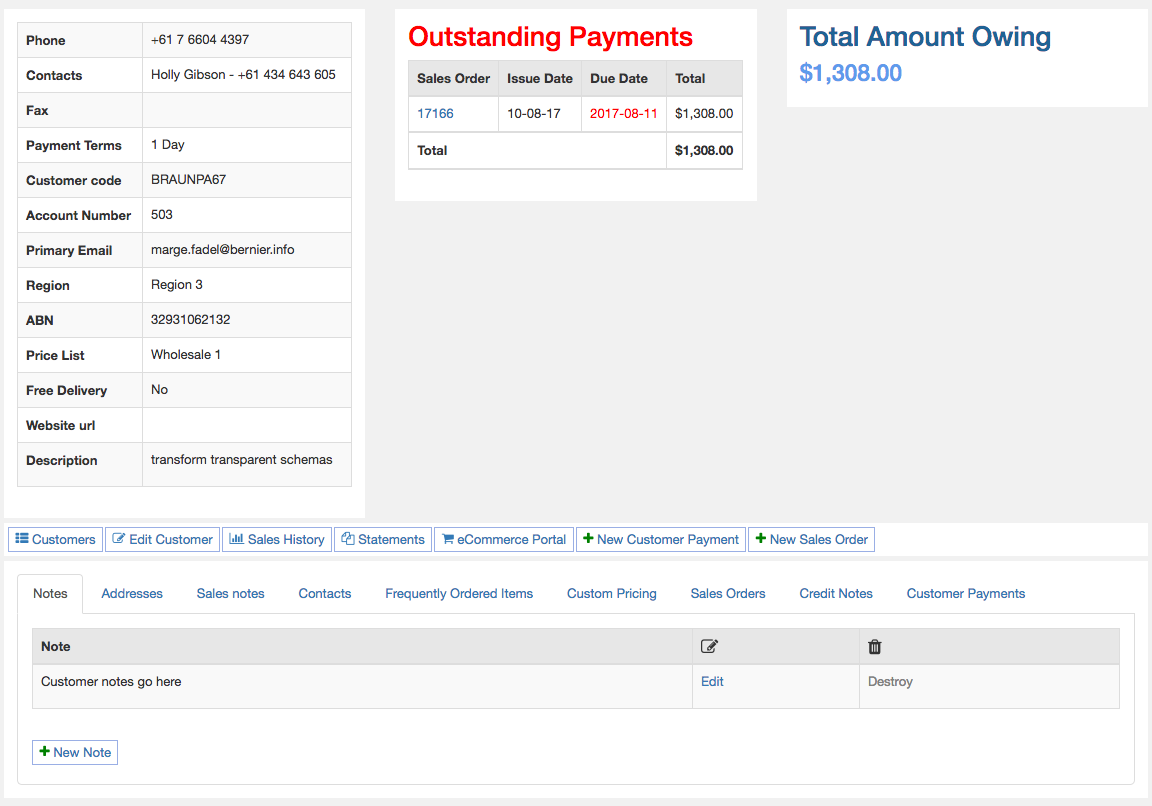
The top left is the customer details such as phone number, email, region and payment terms
On the right will be outstanding payments that are overdue and future payments with a total amount owing
Middle Links
Located in the middle are a list of helpful links
- Customers - Takes you back to the list of all customers.
- Edit Customer - Allows you to edit the customer details.
- Sales History - Shows you current sales for the month and monthly sales totals for preceding months.
- Statements - Allows you to view, print or email statements with the ability to set custom date ranges.
- eCommerce Portal - Allows you to see what the customer sees when they visit the eCommerce portal.
- New Customer Payment - Takes you to the customer payment page with the customer already selected.
- New Sales Order - Takes you to the sales order page with the customer already selected.
Bottom tabs
- Notes - Here is where you can store notes about the customer, such as what time to best call them.
- Addresses - List of addresses for the customer.
- Sales notes - Sales notes that can record customer visits and sales specific notes.
- Contacts - List of contacts for the customer. This is where you can enable eCommerce access for a customer.
- Frequently Ordered Items - List of frequently ordred items, this is automatically generated based on past customer orders. Here you can add or remove any items on the list.
- Custom Pricing - Ability to set custom pricing for the customer. You can add, edit or delete items.
- Sales Orders - View all sales orders for this customer.
- Credit Notes - View all credit notes for this customer.
- Customer Payments - View all customer payments for this customer.
