Help: Processing a customer payment
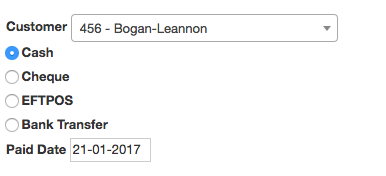
First select your customer if it hasn't already been selected for you.
Next select the type of payment and the date the actual payment was made
Now you can select the Sales Orders and Credit Notes to apply the payment against
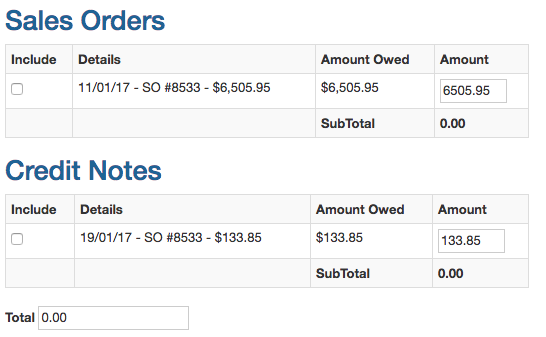 Pro Tip: you can click anywhere on a row to select it, you don't need to click the tiny box
Selecting a Sales Order or Credit note will automatically update the total amount

What to do if a customer under pays
If a customer under pays, first select the sales orders and credit notes that closest match what is paid.
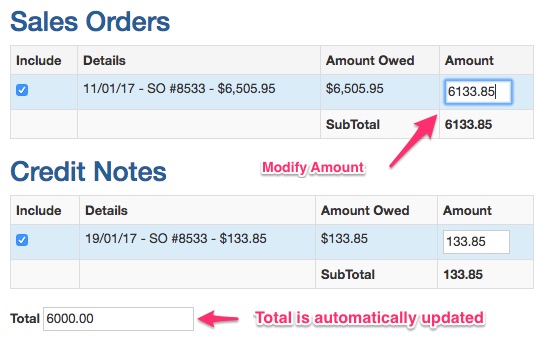
Next modify the amount paid for a sales order by the shortfall. The total at the bottom should match what is paid.
What to do if a customer over pays
If a customer over pays you can modify the total at the bottom of the form and increase it by the over payment amount.
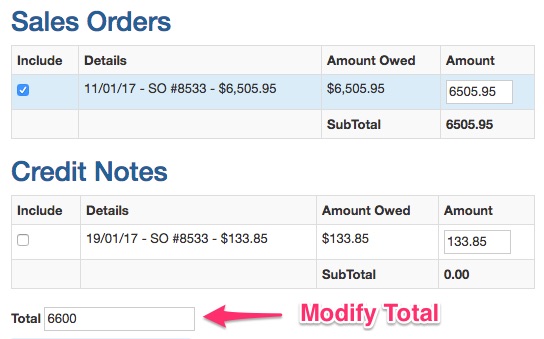
The total should match the final amount. A special credit note will be raised for the difference that can be applied to future payments.
